
Last updated on June 19th, 2025 at 04:18 pm
What is Alipay?
Alipay is a digital payment platform from China, developed by Ant Group, an affiliate of Alibaba Group. Launched in 2004, Alipay was initially created as a payment solution to facilitate transactions on Alibaba's e-commerce platform.
However, over time, Alipay has evolved into a multifunctional platform that offers various financial services, including money transfers, bill payments, loans, investments, and much more.
The History of Alipay
Alipay was first introduced as part of Alibaba's ecosystem to facilitate payments on its e-commerce platform. As Alibaba grew, Alipay became the leading payment platform in China.
Ant Group, the company behind Alipay, continues to innovate and expand its services, making it one of the largest and most innovative digital wallets in the world.
How to Register for Alipay
To sign up for Alipay, you need to download the Alipay app, fill in your personal information, and verify your account with a valid phone number. Here are the easy steps to sign up for Alipay:
- Download the Alipay app from Google Play Store (for Android) or the App Store (for iOS).
- After downloading, open the Alipay app on your device.
- Choose the registration or "sign-up" option.
- Enter your phone number and follow the instructions to verify your phone number.
- Create a password and complete the registration process to create your Alipay account.
- Fill in the required personal information, including your identity details and other necessary data.
- Follow the identity verification process according to the applicable requirements.
- Once all steps are completed, you will successfully register and be able to use Alipay.
Read Also: How to Transfer Money Abroad via BRI
How to Top Up Alipay
To top up your Alipay balance, follow these steps:
- Ensure you have downloaded and installed the Alipay app on your smartphone. Open the app.
- After logging into the app, find and select the "Top Up" or "Add Funds" menu, typically available on the home page or main menu.
- Choose the method or funding source you want to use to top up, such as a bank account or credit card.
- Enter the amount of money you wish to top up into your Alipay account.
- Confirm the transaction by entering the password or PIN requested by the Alipay app.
- Wait a moment until the top up process is complete and you will get a notification or confirmation via the Alipay application.
- Check your Alipay balance to ensure that it has been increased by the top-up amount.
- Ensure you have a stable internet connection during the top-up process to ensure the transaction runs smoothly. Also, make sure you enter the correct amount as desired.
You can also top up your Alipay balance using various methods, including bank transfer, credit cards, or utilizing fund transfer services from Easylink.
How to Transfer Money to Alipay
To transfer money to Alipay, follow these steps:
- Make sure you have and open the Alipay app on your smartphone.
- Log into your Alipay account using your registered phone number and password.
- In the Alipay main menu, search for and select the "Transfer" or "Send Money" option.
- Enter the phone number or Alipay ID of the recipient to whom you want to send money.
- Enter the amount of money you want to transfer.
- Confirm the transfer by entering the password or PIN requested by the Alipay app.
- Alipay will ask for transaction verification through a security code sent to the registered phone number. Enter the code.
- Wait a moment until the transaction is completed, and you will receive a notification or confirmation.
- Make sure the information you entered is correct, including the recipient's number and the transfer amount.
- Always use a stable internet connection to ensure the transaction runs smoothly.
How to Transfer Money to Alipay Using Easylink
With Easylink, you don't need to have an Alipay account to transfer money to Alipay. For instance, when you want to send money to family, study, or work in China.
With Easylink, sending money to China is safer, faster, and easier! So, how can you transfer money to Alipay using Easylink? Here’s how:
- Go to the Easylink website https://easylink.id Then click "Sign In" or "Log In.".
- After that, you’ll be directed to the Easylink dashboard; then click “Send Money.”.
- Select the destination currency for China, then select “Alipay” as the recipient’s account.
- Select a recipient; if you haven't made a transaction with them before, click "Add New Recipient.".
- Please fill in the required information.
- Please double-check the information you entered to make sure it's correct.
- All done! Once verified, your money will be sent to the recipient according to the terms and conditions you read earlier.
Users can send money to Alipay by choosing Alipay as the recipient and entering the recipient's Alipay account details. To send money abroad including to China, you can use Easylink as your international money transfer platform. The process is fast, secure, and easy!

Advantages and Disadvantages of Alipay
Alipay's advantages include ease of use, transaction security, international reach, and a variety of additional services. However, there are also drawbacks, such as limited availability outside of China.
How to Verify Alipay Account for the Recipient
Transactions will be automatically canceled if the recipient does not verify their account before the transaction deadline. Here are the steps to verify the Alipay account:
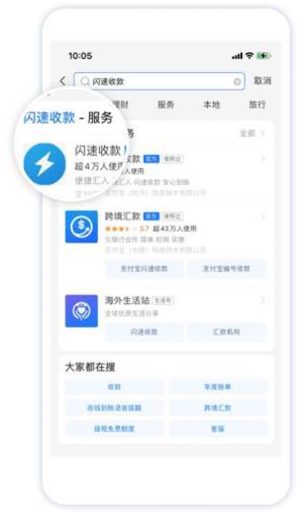
- Open the Alipay app, search for “闪速收款” (Quick Collect), and select the “闪速收款” (Quick Collect) option.
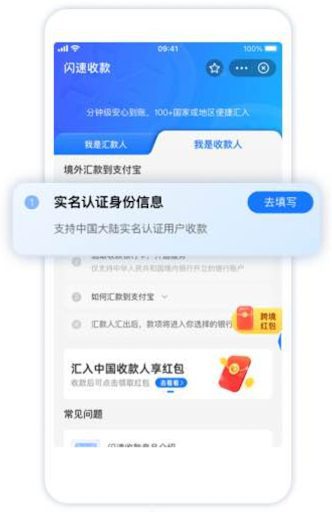
- Currently, Quick Collect “闪速收款” is only available to users who have a Chinese Resident Identity Card, have completed real-name authentication, and have a bank account in China.
- Follow the instructions in Quick Collect “闪速收款” to complete the real-name authentication process.
- Once verification is complete, the recipient must link their card to Alipay before the transaction expires. Make sure the recipient’s bank account is not frozen.

Easylink Provides Money Transfers to China Using Alipay
Easylink allows users to transfer money to Alipay, making it easier to send funds to recipients in China with low administrative fees.
With Easylink, sending money is easy, safe, and fast to over 170+ countries, including China. Save on administrative fees and ensure your money arrives safely and on time. Use Easylink for transfer money abroad secure, fast, and efficient transfers!