


Semua Tagihan.
Satu Aplikasi.
Tanpa Ribet.

Dari listrik hingga internet, bayar semua kebutuhan Anda melalui satu aplikasi dengan proses yang cepat dan praktis.

Kenapa Pilih Easybiller?

EasyBiller hadir untuk membantu kamu membayar berbagai kebutuhan harian dengan lebih praktis. Tidak perlu berpindah aplikasi, cukup lewat Easylink untuk mengelola pembayaran tagihan dengan mudah, cepat, dan aman.

Save More

Urus berbagai tagihan dengan biaya lebih murah dan transparan setiap bulan.

Money Back Guaranted

Transaksi gagal? Dana kamu tetap aman dan akan diproses kembali sesuai ketentuan yang berlaku.

Dipercaya Ribuan Pengguna

EasyBiller telah membantu ribuan pengguna Easylink membayar berbagai tagihan dengan lebih praktis.

Bayar Semua Tagihan dalam Satu Aplikasi

Dari pulsa, paket data, listrik, air, internet, BPJS, PBB, asuransi, hingga multi finance bisa dibayar langsung di Easylink.

Cepat & Tanpa Ribet

Pilih jenis tagihan, cek nominal, lalu bayar dalam beberapa langkah mudah tanpa perlu antre atau berpindah aplikasi.

Customer Service 24/7

Ada kendala saat transaksi? Customer Service Easylink siap membantu 24/7.

Category Biller

Cara Bayar Tagihan Dengan Easybiller

cek-bill-payment

1

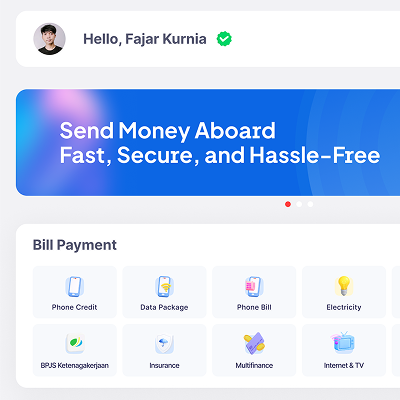
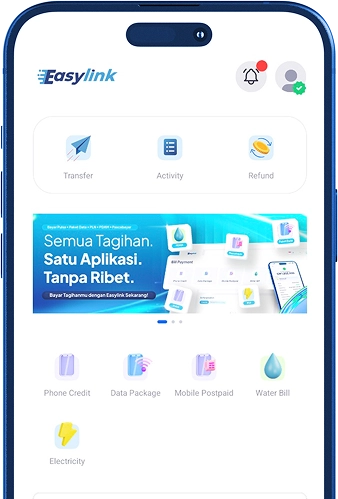
Temukan Layanan Bill Payment

Buka halaman utama aplikasi, lalu pilih jenis transaksi yang Anda butuhkan pada bagian Bill Payment.

masukkan-no-hp-bill-payment

2

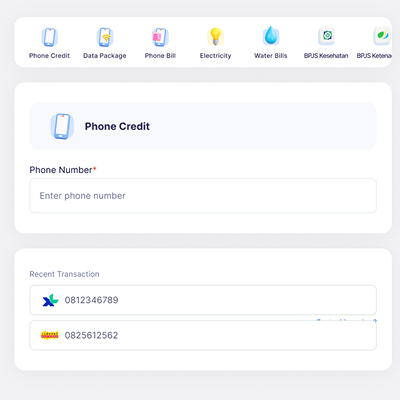
Enter your cell phone number

Ketik nomor tujuan yang ingin diisi pulsa, atau pilih langsung dari daftar transaksi terakhir Anda.

Select a credit amount

3

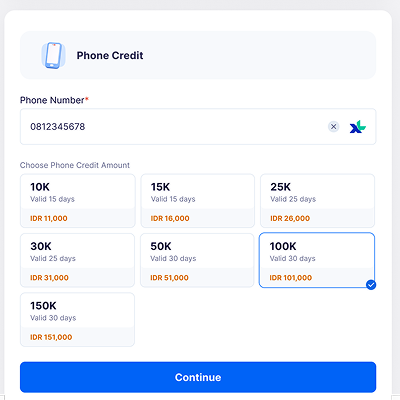
Select a Credit Amount

Pilih jumlah nominal pulsa yang Anda butuhkan, kemudian klik tombol Continue.

penerima

4

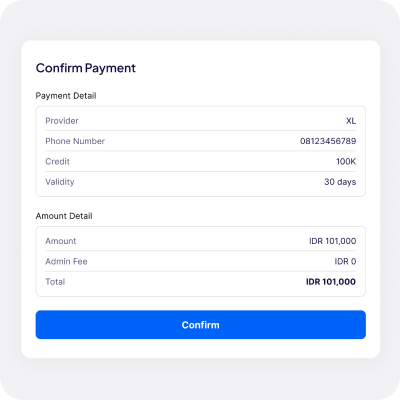
Konfirmasi Pembayaran

Cek kembali nomor HP dan detail biaya. Jika semua informasi sudah benar, klik Confirm.

metode-pembayaran

5

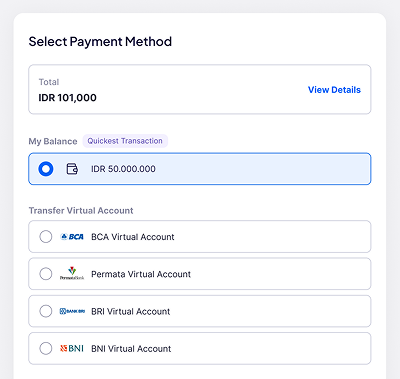
Select a Payment Method

Pilih metode pembayaran yang Anda inginkan, bisa menggunakan saldo akun atau Virtual Account.

pembelian-berhasil

6

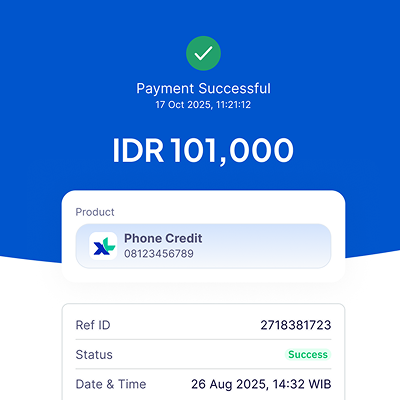
Purchase Successful

Transaksi Anda selesai diproses. Resi digital otomatis tersimpan sebagai bukti pembayaran yang sah.

FAQ EasyBiller

EasyBiller is a bill payment feature in the Easylink app that makes it easy for you to pay for various daily expenses all in one app.

You can pay for phone credit, data plans, electricity, PDAM water bills, internet and TV, BPJS, property tax (PBB), insurance, multifinance loans, credit cards, and other bills available on the app.

Simply open the Easylink app or website, select the EasyBiller or Bill Payment menu, choose the bill type, enter the required information, review the payment details, and then complete the transaction.

Yes, you can. Before the transaction is processed, you can view the billing details, payment amount, administrative fees, and other information to ensure the payment is clear and transparent.

Administrative fees may vary depending on the type of bill and the service provider. Fee information will be displayed before you complete the transaction.

Yes, payments made through EasyBiller are processed via the Easylink system, which is designed to ensure the security and convenience of user transactions.

Yes, you can make payments through EasyBiller at any time via the Easylink app or website. However, certain billing services may follow the processing schedules set by their respective billing providers.

If the payment was successful but your bill hasn't been updated yet, you can wait for the service provider to complete the synchronization process. If you're still experiencing issues, contact Easylink Customer Service for further assistance.

Yes, you can. You can check your transaction status in real time on the Easylink app or website, and you can view your payment history at any time.

If the transaction fails, your funds will remain secure and a refund will be processed (refund) in accordance with applicable regulations. You can also contact Easylink Customer Service for assistance in checking your transaction status.

Daftar sekarang dan mulai transaksi bareng Easylink!

Tampilan aplikasi Easylink
Notifikasi transaksi Easylink